


 Conditions générale de vente
 Confidentialité
 Help center
How to Use Grammarly Like a Pro in 2025
Introduction
In today’s fast-paced digital world, writing plays a huge role in communication. Whether you’re a student, a professional, a blogger, or a business owner, polished writing makes a lasting impression. That’s where Grammarly steps in.
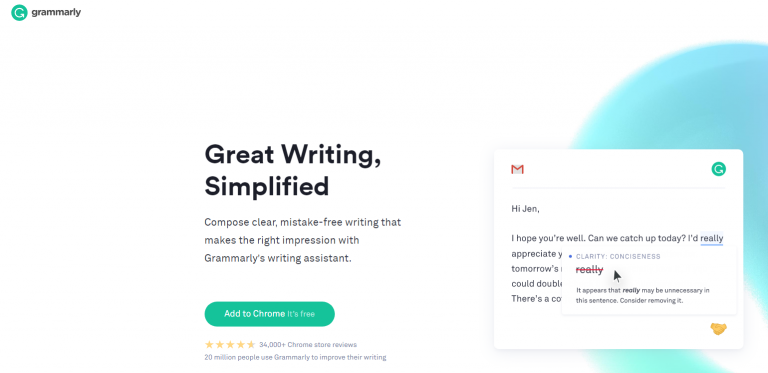
Grammarly is more than just a grammar checker. It’s an AI-powered writing assistant that helps you improve spelling, punctuation, tone, clarity, and even plagiarism detection. By 2025, Grammarly has become smarter, faster, and more accurate, making it an essential tool for anyone who wants to write with confidence.
In this guide, we’ll show you how to use Grammarly like a pro in 2025. You’ll learn about its features, how to set it up, advanced tips, and how to get the most out of both the free and premium versions.
What is Grammarly?
Grammarly is an AI-driven writing tool that analyzes text for grammar, spelling, punctuation, clarity, and tone. It provides real-time suggestions, making your writing more professional and easier to understand.
Grammarly works across platforms, including:
-
Web browsers (Chrome, Firefox, Safari, Edge)
-
Desktop apps (Windows and Mac)
-
Mobile apps (iOS and Android)
-
Microsoft Word and Outlook integration
-
Google Docs and Gmail extensions
By 2025, Grammarly has expanded to include AI-powered rewriting, style recommendations, and even voice-to-text proofreading.
Why Use Grammarly in 2025?
There are plenty of writing tools available, but Grammarly stands out because it:
-
Saves Time: Instantly corrects errors instead of manual proofreading.
-
Improves Accuracy: Identifies grammar mistakes and awkward phrasing.
-
Adapts to Your Style: Offers tone suggestions based on your audience.
-
Boosts Confidence: Ensures professional writing in emails, reports, and academic work.
-
Cross-Platform Use: Works everywhere you write—desktop, mobile, and cloud.
If you want to write like a pro, Grammarly is your must-have companion.
Getting Started with Grammarly
Here’s how to set up Grammarly step by step:
1. Create an Account
Visit Grammarly.com and sign up using your email, Google, Apple ID, or Facebook.
2. Install the Extension
Add the Grammarly extension to your preferred browser. This allows Grammarly to check your writing on platforms like Gmail, LinkedIn, Twitter, and Google Docs.
3. Download the Desktop App
For heavy writers, downloading the Windows or Mac desktop app provides advanced functionality.
4. Enable Keyboard on Mobile
Grammarly’s mobile app includes a custom keyboard that checks your writing in real-time across messaging apps and browsers.
5. Adjust Settings
You can personalize Grammarly by setting your:
-
Preferred English style (American, British, Canadian, Australian)
-
Writing goals (formal, casual, academic, business)
-
Tone preference (confident, friendly, direct, informative)
Grammarly Free vs Grammarly Premium
Grammarly offers two main versions. Here’s a comparison to help you decide:
| Feature | Free Version | Premium Version |
|---|---|---|
| Grammar & Spelling Check | ✔️ | ✔️ |
| Punctuation | ✔️ | ✔️ |
| Tone Detection | ❌ | ✔️ |
| Clarity Suggestions | ❌ | ✔️ |
| Vocabulary Enhancement | ❌ | ✔️ |
| Style & Formality Check | ❌ | ✔️ |
| Plagiarism Detection | ❌ | ✔️ |
| Advanced Rewrite | ❌ | ✔️ |
👉 Pro Tip: If you’re a student, professional writer, or run a business, Grammarly Premium is worth it. It unlocks advanced tools that elevate your writing quality.
How to Use Grammarly Like a Pro
Now that you understand the basics, let’s dive into advanced tips and tricks to make the most of Grammarly in 2025.
1. Set Writing Goals
Before you start, Grammarly asks you to set goals for your writing. For example:
-
Audience: General, knowledgeable, or expert
-
Formality: Informal, neutral, formal
-
Tone: Optimistic, confident, friendly, analytical
-
Intent: Inform, describe, persuade, tell a story
These goals help Grammarly customize suggestions for your specific needs.
2. Use the Tone Detector
Grammarly’s tone detector shows how your message might sound to readers. For example, an email may sound “formal,” “confident,” or “casual.” This helps adjust your writing for the right audience.
3. Leverage Advanced Rewriting
In 2025, Grammarly’s AI rewriting tool is more powerful than ever. It can:
-
Rephrase long sentences
-
Suggest concise alternatives
-
Improve flow and readability
-
Adjust tone (make text more professional, casual, or persuasive)
4. Check for Plagiarism
If you’re writing essays, research papers, or blog posts, plagiarism detection is a must. Grammarly compares your work against billions of web pages and academic papers to ensure originality.
5. Use Vocabulary Enhancements
Grammarly Premium suggests stronger word choices. Instead of repeating “good,” it might suggest “excellent,” “remarkable,” or “outstanding.” This makes your writing more engaging.
6. Integrate with Google Docs & MS Word
Grammarly works directly inside Google Docs and Microsoft Word. This ensures error-free documents without needing to copy and paste into another editor.
7. Master Grammarly Keyboard on Mobile
With the mobile keyboard, you can send professional text messages, write social media posts, or craft business emails without worrying about typos.
Benefits of Using Grammarly Daily
Using Grammarly regularly can:
-
Improve your grammar knowledge over time.
-
Help you avoid embarrassing mistakes in professional emails.
-
Make your essays and reports clearer and more persuasive.
-
Strengthen your business communication.
-
Build confidence in your writing, even if English isn’t your first language.
Grammarly for Professionals in 2025
If you’re a business professional, Grammarly can be a game-changer:
-
Email Communication: Write clear, polite, and professional emails.
-
Reports and Proposals: Ensure error-free documents with strong vocabulary.
-
Marketing Content: Craft persuasive and engaging ad copy.
-
Team Collaboration: Grammarly Business offers team accounts, ensuring brand-consistent writing across your organization.
Grammarly for Students in 2025
Students can benefit greatly from Grammarly:
-
Essays and Assignments: Avoid grammar mistakes and improve sentence structure.
-
Research Papers: Use plagiarism detection to stay safe.
-
Scholarship Applications: Write polished and professional applications.
-
Presentations: Ensure slides and notes are error-free.
Grammarly Alternatives
While Grammarly is a top tool, some alternatives are worth considering:
-
ProWritingAid – Great for in-depth style and structure analysis.
-
Hemingway Editor – Focuses on readability and simplicity.
-
Ginger Software – Good for quick grammar checks.
-
QuillBot – Excellent for paraphrasing and rewriting.
Still, Grammarly remains the most well-rounded writing assistant in 2025.
Frequently Asked Questions (FAQ)
1. Is Grammarly free in 2025?
Yes, Grammarly offers a free version with grammar, spelling, and punctuation checks. Premium has advanced features.
2. Is Grammarly safe to use?
Yes. Grammarly uses encryption to protect your data and does not sell your content.
3. Can Grammarly check plagiarism?
Yes, but only in the premium version. It compares text against billions of sources.
4. Does Grammarly work offline?
Currently, Grammarly requires internet access to analyze text.
5. Is Grammarly worth paying for in 2025?
Yes, especially for professionals, students, and businesses that need high-quality writing.
- Marketing & Social Media
- AI & Digital Tools
- Science & Innovation
- Business & Finance
- Education & Learning
- Technology & Gadgets
- Family & Relationships
- Parenting & Kids
- Fashion & Beauty
- Travel & Culture
- News & Politics
- Domicile
- Literature
- Music
- Networking
- Autre
- Party
- Religion
- Shopping
- Sports
- Theater
- Wellness
- Art
- Causes
- Crafts
- Dance
- Drinks
- Film
- Fitness
- Food
- Gardening
- Health
- Jeux

 አማርኛ
አማርኛ
 Afaan Oromoo
 English
 Arabic
 Spanish
 Portuguese
 Deutsch
 Turkish
 Dutch
Dutch
 Italiano
 Russian
 Romaian
 Portuguese (Brazil)
 Greek
Greek