


 Goto chatroom
 Termos
 Privacidade
Transforming Images: A Quick Guide to Professional Photo Colour Change Services
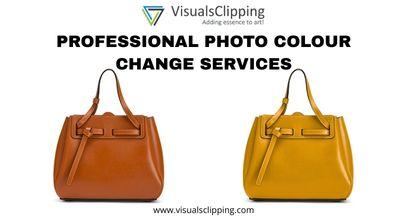
In the current modern age, colour plays a vital role in storytelling and attracting customers. Whether you are the owner of a clothing brand or a jewellery brand, it is imperative for you to make sure that the colours of your product in pictures are perfect and reflect the reality immensely.
This is where professionals utilise photo colour change services, as these services can assist you in transforming your images in meaningful ways. The blog will explore the basics of these services, who should use them and how these services work.
Introduction to a Photo Colour Change Service
A Photo color change service lets you alter the colours in an image by either recolouring the whole image, such as transforming a black and white photograph into full colour, or by altering the colours of some objects, like a background or a shirt. Professional editors provide these services using Adobe Photoshop or AI-based systems. The use of this service ensures that you do not need to spend large amounts on an additional photoshoot for the same item.
Who should use a Photo colour change service?
-
Online businesses: Without capturing each variation, feature the same product in many colours.
-
Fashion designers: Before production, see garment prototypes in many hues.
-
Photographers and artists: Artists and photographers ought to match colours with particular themes or correct lighting asymmetries.
-
Individuals: Give your old, faded, or black-and-white family pictures colourisation to make them unique.
What can you change using a Photo Colour Change Service?
One of the most useful aspects of using a photo colour change service is the fact that almost any aspect of the picture, whether coloured or black and white, can be changed using this service.
-
Clothes and accessories
-
Product packaging
-
The entire background of the pictures
-
Eye, hair or skin tone
-
Vehicles, buildings and furniture
Exploring the process to use a Photo Colour Change Service
Now that you have the foundational information regarding this service, let’s move forward and learn the steps through which you can access and use it.
-
Image Submission: Get a high-resolution image and upload it to the website or application.
-
Selection and Masking: This step allows you to choose the areas that you want to recolour without affecting other elements of the image.
-
Colour Matching: While choosing new colours, use the references of standard colours provided to you.
-
Review and saving: Lastly, you can preview the picture after the colour has been changed, and if done correctly, you can save it on your device.
With this procedure, you can effectively change the colour of any element in your images without any worries.
Source: Visuals Clipping
- Jogos
- Religion
- Party
- Networking
- Music
- Literature
- Art
- Health
- Gardening
- Shopping
- Food
- Fitness
- Film
- Drinks
- Dance
- Crafts
- Causes
- Wellness
- Devotional Reflections
- Bible Study & Scripture Insights
- Prayer & Worship
- Christian Living
- Spiritual Growth & Discipleship
- Testimonies & Personal Journeys
- Christian Theology & Doctrine
- Church Calendar & Liturgical Seasons
- Christian Service & Mission
- Gardening
- Health
- Início
- Literature
- Networking
- Outro

 አማርኛ
አማርኛ
 Afaan Oromoo
 English
 Arabic
 French
 Spanish
 Portuguese
 Deutsch
 Turkish
 Dutch
Dutch
 Italiano
 Russian
 Romaian
 Greek
Greek